MCP Supply Chain Analytics
Monitor your entire MCP ecosystem with comprehensive supply chain visibility. Track server verification status, attestation health, capability drift, and agent-MCP dependencies from a single dashboard.
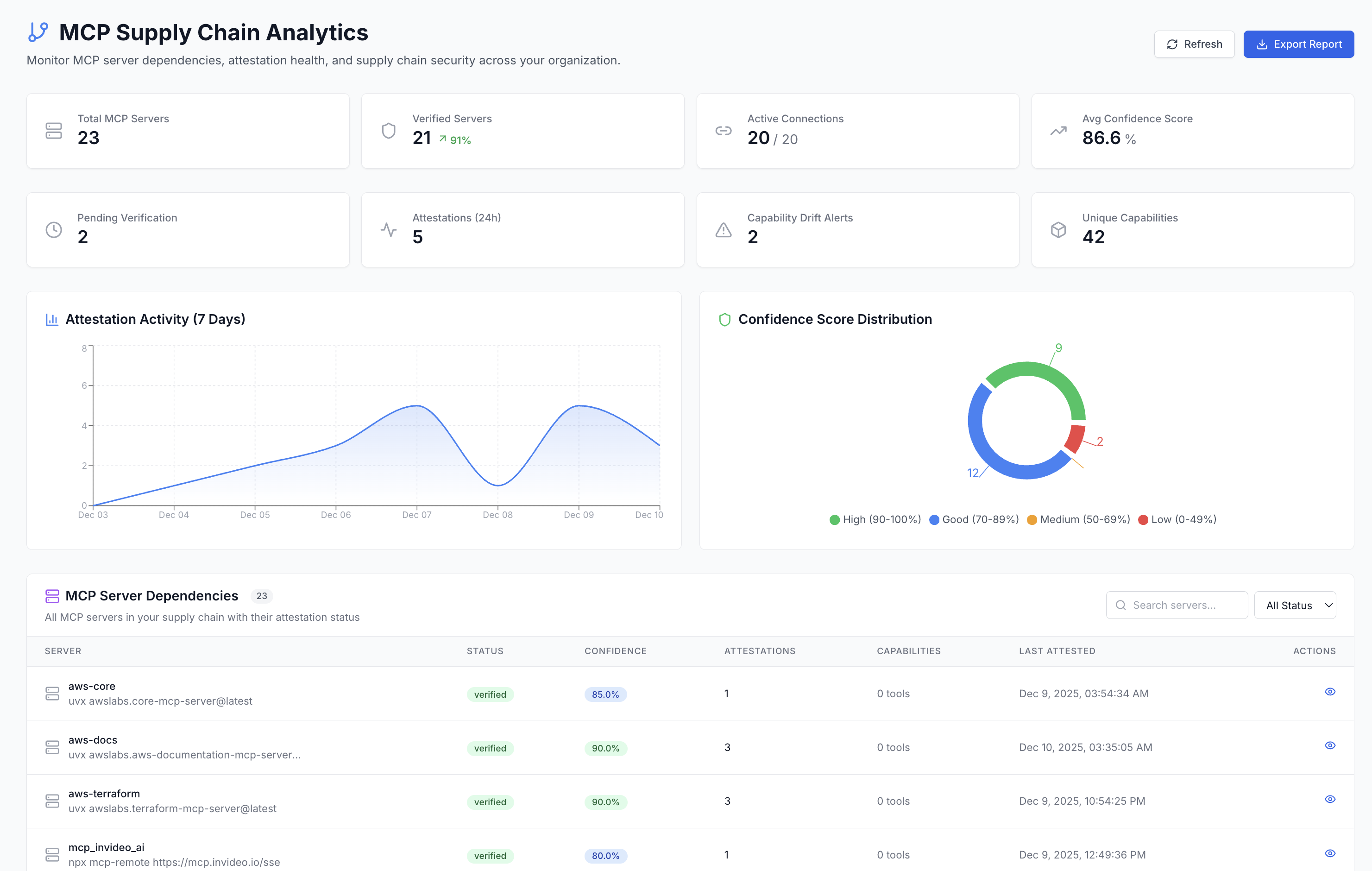
Key Features
Visual breakdown of server trust levels (High/Good/Medium/Low) across your organization
7-day graph showing attestation patterns and verification activity
Automatic detection when MCP server tools change unexpectedly
Track which agents depend on which MCP servers
Dashboard Metrics
| Metric | Description |
|---|---|
| Total MCP Servers | All servers registered in your organization |
| Verified Servers | Servers that have passed attestation verification |
| Pending Verification | Servers awaiting first attestation |
| Avg Confidence Score | Average trust score across all servers |
| Agent-MCP Connections | Total active connections between agents and MCP servers |
| Drift Alerts | Number of capability drift alerts requiring attention |
Confidence Score Distribution
Servers are categorized by their confidence level based on attestation history, verification status, and usage patterns:
Multiple attestations, stable capabilities, fully verified
Verified with regular attestations
Few attestations, needs more verification
Unverified or suspicious activity detected
CLI Commands for MCP Supply Chain
The OpenA2A CLI provides commands for auditing and securing MCP servers from the terminal. These commands work locally without requiring the AIM platform server.
# Audit all MCP servers in your configuration
opena2a mcp audit

# Output:
# Scanning claude_desktop_config.json...
# Found 4 MCP servers
# [WARN] github-mcp: unsigned, no attestation
# [PASS] filesystem-mcp: signed, 12 attestations, confidence 94%
# [WARN] postgres-mcp: signed, 2 attestations, confidence 68%
# [PASS] slack-mcp: signed, 8 attestations, confidence 88%

# Sign an MCP server with your agent identity
opena2a mcp sign --server filesystem-mcp

# Check trust scores from the registry
opena2a mcp trust --server github-mcp

# Output:
# Server: github-mcp
# Trust Score: 45/100
# Attestations: 0
# Status: UNVERIFIED
# Recommendation: Create an attestation to establish trust
Supply chain risks in MCP include unsigned servers running arbitrary code, capability drift where servers silently add new tools, and dependency confusion where a malicious server impersonates a legitimate one. These commands help detect and mitigate those risks.
Auto-Attestation
Zero-Friction Verification
The SDK automatically creates attestations on first tool use. No manual intervention required.
How Auto-Attestation Works:
- 1First Tool Use: Agent uses an MCP tool for the first time
- 2Automatic Discovery: SDK discovers server capabilities
- 3Create Attestation: Attestation created with discovered tools
- 4Update Confidence: Server confidence score increases
Capability Drift Detection
Detect Unexpected Changes
AIM detects MCP server capability drift - when a server's available tools change from the baseline.
What Triggers Alerts:
- + New tools added to MCP server
- - Tools removed from MCP server
- ~ Tool parameters changed
- ! Permission scope expanded
Alert Actions:
- Review drift in dashboard
- Approve changes to update baseline
- Reject and investigate suspicious changes
- Auto-approve trusted patterns
Server Dependencies
The Supply Chain Analytics dashboard shows all MCP servers with their verification status and dependencies:
Server Details Include:
- Verification status (verified/pending)
- Confidence score percentage
- Number of attestations
- Available capabilities (tools)
- Last attestation timestamp
- Connected agents count
Accessing the Dashboard
Navigate to the Supply Chain Analytics dashboard:
Or click MCP Servers → Supply Chain in the dashboard sidebar.