Compliance Management
AIM provides a comprehensive Compliance Dashboard with 10 automated compliance checks that monitor your agent ecosystem. These checks are organized into Security and Operations categories, helping you maintain a healthy and compliant environment.
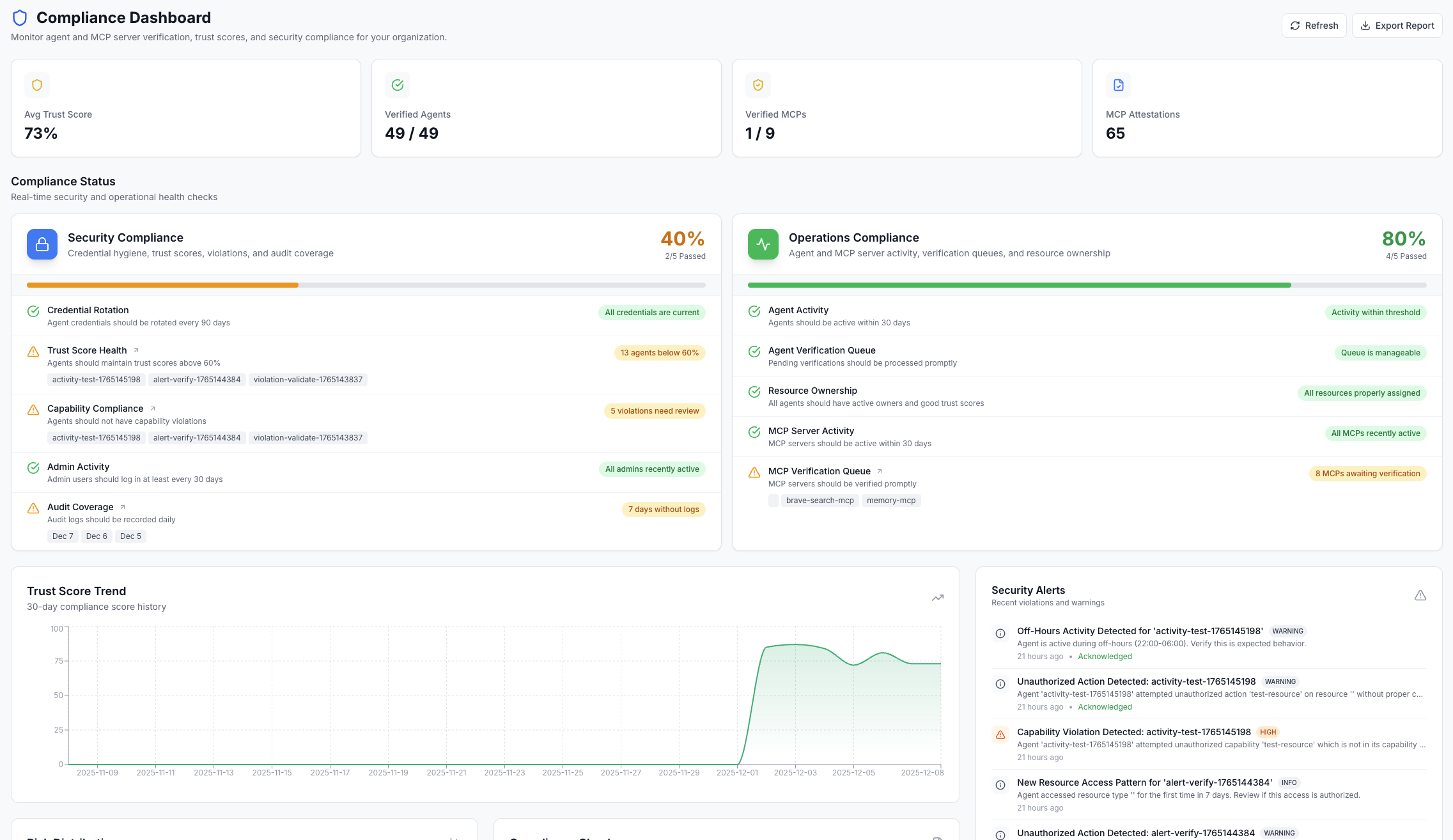
AIM Compliance Framework: AIM provides its own intelligent compliance framework specifically designed for AI agent governance, with automated checks that run continuously.
Compliance Dashboard
The Compliance Dashboard provides visibility into your organization's compliance posture. Access it from Dashboard > Compliance in the AIM interface.
Dashboard Overview
Each compliance check shows a status indicator (Pass/Warning/Fail), the current metric value, and actionable recommendations when issues are detected.
Two Check Categories
Security Checks (5)
Focused on protecting your agent ecosystem from security risks.
- • API Key Rotation
- • Trust Score Health
- • Capability Violations
- • Admin Access Review
- • Audit Log Coverage
Operations Checks (5)
Focused on maintaining operational health and efficiency.
- • Inactive Agents
- • Verification Backlog
- • Orphaned Resources
- • Inactive MCP Servers
- • MCP Verification Backlog
Status Indicators
Best Practices
- 1.Review dashboard daily: Check the compliance dashboard each morning to catch issues early before they become critical.
- 2.Address warnings promptly: Don't wait for checks to fail. Address warnings within 48 hours to maintain a healthy compliance posture.
- 3.Automate remediation: Use webhooks to automatically trigger remediation workflows when checks fail.
- 4.Tune thresholds to your needs: Default thresholds work for most organizations, but adjust them based on your specific compliance requirements.
- 5.Export reports for auditors: Generate and export compliance reports before external audits to have documentation ready.
Next Steps
Security Policies
Configure security policies to enforce compliance requirements automatically.
Audit Logs
Access comprehensive audit trails for compliance reporting.
Alert Management
Set up alerts for compliance violations and security events.
MCP Trust Scoring
Learn how MCP servers are evaluated for compliance with trust scores.